FREE ONLINE PHOTOMONTAGES WITH CELEBRITIES

The creation of photomontage and collage online is really a very widespread at the level of enjoyment by users of the Web ...

CCLEANER : THE BEST SOFTWARE FOR THE PC CLEAN

The need to clean your computer has practically lived by everyone using it today. This need arises because so many programs we install ...

PHOTOMONTAGER.COM DOWNLOAD GRATIS

PHOTOMONTAGER.COM is a site that allows you to create very beautiful photomontages and download them without the need to register ...

NETSTUMBLER FOR WINDOWS 7 - 8

Often we notice that the wifi signal of our WLAN network is weak or, in some moments, it is best received by our network card or USB adapter ...

THE BEST SITES FOR FREE ONLINE PHOTO EDITING

In this article I go on to describe useful tools, applications, software and online services for editing pictures and all ...

THE BEST FREE ANTI-VIRUS SOFTWARE TO PROTECT THE PC

THE BEST FREE ANTI-VIRUS SOFTWARE TO PROTECT THE PC
The title of this post is not correct, as I realized that the best antivirus there is not. The algorithms used are very advanced up to the use of heuristic algorithms to scan very well made. By now, all major software companies that create and update antivirus programs are progressed and the choice depends a lot from us. Certainly there are more bad software to be excluded. So there are a number of other best software around for virus protection. We are in 2011 and I will list those who are undoubtedly the most used and most efficient freeware virus protection.

Before listing, I explain what's a computer virus. A virus is a small program created especially by so-called hackers, with various features. A virus can take a specific name according to that for which it was created :

SPYWARE : these viruses are designed to be installed on PCs and "copying", storing them properly, sensitive data in your hard drive. It 's so that those have current account data on your computer, can be seen the account emptied.

BACKDOOR : a type of virus that sets himself the task of putting in touch our computer with hacker  computer. The attacker then gets full control of the infected PC and can do whatever he wants. The connection, of course, is so invisible and we do not notice anything.

But the list is endless as there are all types of malware as various troyan, rootkits, etc. ... It's good to say that rootkits are programs designed to hide certain processes on your PC. There is therefore said that they can hide but may contain viruses in some cases. In fact because of their characteristic hide processes, some malware exploiting them.

As mentioned, the list of viruses is endless. Where can they hide these viruses ?
  1. Through pictures and images that are downloaded or attached to email.
  2. In executable programs (.exe).
  3. In various links on the web.
But we now see the list, describing the main features which the best free software for effective protection against viruses. Among the four that I will list, there is one that has not a freeware version (ESET NOD 32) but you believe me, it is exceptional.

AVAST ANTIVIRUS HOME EDITION
 FREE AVAST ANTIVIRUS GRATIS
One of the most popular ad used antivirus with a downloadable version for free for home use.

Here are its basic features :
  1. Simple configuration parameters.
  2. Scan your system very fast.
  3. Using little system resources.
  4. Continuous update database virus and program.
  5. GUI very well maintained with customizable layout.
WEB SITE : AVAST ANTIVIRUS HOME EDITION

AVIRA ANTIVIRUS FREE EDITION
AVIRA ANTIVIRUS PERSONAL FREE ANTIVIRUS
Security software virus that is catching on among average users, given its continuing development. Its heuristic scanning system against threats not yet cataloged in the central database, is very good.

Here are its basic features :
  1. GUI very well maintained.
  2. Update light and silent.
  3. Fancy graphics but at the same time with a menu easy to understand and navigate.
  4. Heuristic system for blocking viruses not yet known.
  5. A database of more than 200,000 viruses.
  6. Real-time scanning in the background.
  7. Update program very fast.
  8. Phishing protection system.
WEB SITE : AVIRA ANTIVIRUS FREE EDITION

AVG ANTIVIRUS FREE EDITION
AVG FREE EDITION
Also AVG freeware version, is among the most popular and downloaded by users with powerful versions  and additional scanning programs for download and use together the main AVG antivirus.

Here are its basic features :
  1. Very simple installation wizard.
  2. Protection against viruses and spyware.
  3. Control function on the web pages to open.
  4. CPU and system resource usage minimal.
  5. Constant update virus database program.
  6. Anti Phishing function very well done.
  7. Control of USB devices when we connect them.
  8. Very fast full system scan.
  9. Protection system during online play.
WEB SITE : AVG ANTIVIRUS FREE EDITION

ESET NOD32 SHAREWARE EDITION
THE BEST ANTIVIRUS : NOD32
It's not freeware but who can afford its price (not very high) will finds it one of the most powerful anti-virus in circulation. Really more of a plus than others.
  1. Function Remote Administrator, in the Enterprise package, which allows using a single control panel on different PCs connected to the Internet using LAN.
  2. Outstanding performance and system resources used, minimum.
  3. Particular ThreatSense ® Technology, which monitors the codes of programs to check into a possible future malicious operation.
  4. Proactive Recognition System in real time. The virus is identified immediately and do not have time to settle in the system. The computer does not remain, even for a second, unprotected.
  5. Scan report very detailed.
  6. Operation designed specifically for small and large businesses with a LAN connected to the WEB.
WEB SITE : ESET NOD32 SHAREWARE EDITION

These are the four best antivirus. I created a real HIT PARADE 2011. For home use AVAST, AVIRA and AVG are fine. To better control virus on different computers connected via LAN, ESET NOD32 is the right solution.

Now you decide, but I recommend you to install your antivirus and I remember you that protection against attacks from the Web does not end here. I'll talk soon also about FIREWALL and scanning utility.

Subscribe to my FEED RSS freeware software for pc feed rss


THE BEST SOFTWARE FOR SHARING INFORMATION ON THE WEB

THE BEST SOFTWARE FOR SHARING INFORMATION ON THE WEB
Who owns a blog or news site knows the importance of posting articles on various social networks, news aggregators, etc. ... This requirement arises particularly for those who have a site / blog or a commercial site and wish to share their contents to an ever greater.

Clearly, to post an article every news aggregator implies a long time. That's why I decided to use two important widgets to share the news faster :
  1. SHARE BUTTON CALLED ADDTHIS.
  2. SHARE BUTTON CALLED ONLYWIRE.
Going to the end of my post, you will notice two buttons to share articles, one is a well known and used all over the web, the other a little less but with exceptional features. Although the title of my post is "THE BEST SOFTWARE FOR SHARING INFORMATION ON THE WEB", in reality these two buttons can be obtained by installing, at code level, two simple javascript.

But how does work ONLYWIRE button to bookmark and share ?

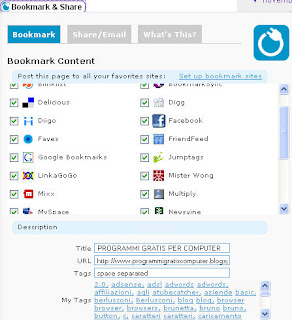
Just go to the site ONLYWIRE.COM, create a free account and download the button to enter in the site / blog. We can also put it in the toolbar of Firefox, so that we can access at the configuration each time without going over the OnlyWire site. Once registered we decide to register site/blog as aggregators and social bookmarking. If we, for example, already registered with Google Bookmarks, simply type in the list that appears, login and password. The list is very long and there are aggregators and social bookmark sites from around the world.

Requires that we first go to register on each of these sites after we post. Here is a screenshot of the OnlyWire button OnlyWire :
THE BEST SOFTWARE FOR SHARING INFORMATION ON THE WEB
The access data are stored in a database and therefore we should not necessarily remember every time.

Once we decide to post an article, just go on the OnlyWire button and insert the title of this post, tags, the web address of the news and a small or full description. Click afterwards on the "Bookmark" and the news will be posted.

Warning ! Not all social bookmarking sites allow an item like this. For some, in fact, you will have to go on  site and finish the insertion of the news. The state of the news, so if it was posted or not, we can view it by opening our account with OnlyWire. In addition, we can choose to receive email notification of carried out operations by the script that controls the button OnlyWire.

There are many methods of sharing, many buttons, many icons but that to keep in mind is that you should not overfill your site / blog with scripts because it could slow dramatically the page loads.

I chose OnlyWire service and I'm glad, it works perfectly and I have personally verified that the news will be posted almost immediately on the sites I chose in the precompiled and stored list. The site to visit, I remind you, to try the service, is : ONLYWIRE.COM.

Subscribe to my FEED RSS freeware software for pc feed rss


THE BEST SOFTWARE TO DOWNLOAD VIDEO FROM THE WEB

THE BEST SOFTWARE TO DOWNLOAD VIDEO FROM THE WEB
The best I found and I use whenever I download a video, is ATUBECATCHER. Its many features and its ease of use make it an absolutely essential software to be installed on any PC. I describe its main functions :
  1. Simple and efficient user interface.
  2. Layout very well done.
  3. Download any audio and video formats.
  4. Safely converts video formats between the most used.
  5. Update function in real time.
  6. List of videos you can download on the visited site.
  7.  Updated to run on Windows 7.
I list which formats allows you to download : FLV (Flash), 3GP, 3G2, AVI, XVID, MP4, MP3, MP2, WMA, WMV, GIF, FLAC, WAV, PSP, MOV, VOB, OGG, MPG.
THE BEST SOFTWARE TO DOWNLOAD VIDEO FROM THE WEB
Not enough ? Practically all audio formats used in video can be captured on your hard drive. The system is very simple. Just go to the site from which you want to download the video. Play the video, copy the full link that appears in the address bar of your browser and paste it inside the box called "source" of ATUBECATCHER. Click download button and video will be download. Before pressing the button "download" we can decide in what format the video should be converted. We can choose between AVI, MPG, WMV, etc.. Made then download, the program will convert the video in the format chosen and will store it in the path we have chosen.

The software is freeware and can be downloaded at this address : ATUBECATCHER. Install it and use it will be easy ! In addition, you can take an audio file video from your PC and convert it into another format.

The only problem of this software for downloading videos from the web is that some special flash video clips, can not be downloaded, but this, I noticed, depends on the particular solutions adopted for displaying some video on particular website.

ATUBECATCHER is undoubtedly the best software to download and convert videos from the WEB.

Subscribe to my FEED RSS freeware software for pc feed rss


DEFRAGGLER : THE BEST SOFTWARE TO DEFRAGMENT THE HARD DISK DRIVE

DEFRAGGLER : THE BEST SOFTWARE TO DEFRAGMENT THE HARD DISK DRIVE
Who has never been faced with a defragmentation of your internal or external hard drive ? Defragmentation is necessary to perform when:
  1. We installed and uninstalled applications, many times.
  2. We have deleted files and folders on large quantities.
  3. We notice a significant slowdown of the operating system.
The third point is a consequence of the first two. In fact, when we installed and uninstalled applications, tools, hardware upgrades, different software, it happens that iy creates the fragmentation within the disk. First, we must say that when software is uninstalled, not all associated files are deleted. Sometimes even whole no longer useful folders remain somewhere. In addition, many library files (.DLL) remain in the registry and we do not know if delete them or not. This is because some library files are shared by different programs.

To resolve the issue of cleaning files no longer useful to the system I suggest you read my article about CCLEANER. Regarding the need to defragment your hard disk, the best freeware software that I recommend is DEFRAGGLER.

Why, when the HD files are too fragmented, the computer slows down ? Simple, because the heads of our hard drives should take a longer path to go looking for them and imagine that many operations are performed in a split second. Defragmenting the HD means :
  1. Speed up your PC.
  2. Improving the performance of your hard drive.
  3. Heads hard drive survive longer.
    DEFRAGGLER : THE BEST SOFTWARE TO DEFRAGMENT THE HARD DISK DRIVE
    Every Windows operating system, has a classic defragmentation utility, but DEFRAGGLER was created especially to perform this operation much more efficient. List the main features :
    1. Quick and easy installation.
    2. Navigable menus and graphics well done.
    3. Disk analysis very fast.
    4. List of files to defragment.
    5. Choice of individual files that start defragmentation.
    6. We choose the date and time to start defragmentation.
    7. Graphic map in real time to verify the operation.
    8. Recovery of empty space.
    9. Accurate final summary.
    10. Also updated for 64 bits Windows 7 version.
    This defrag software is by PIRIFORM, a software leader in creating applications to enhance the functions of the PC and that is why I recommend DEFRAGGLER, which among other things, read and write files, it is very safe because it uses the same techniques of the defragmentation utility in Windows operating system.

    My advice is to use DEFRAGGLER each time you run more than 10 transactions between install and uninstall program and when you notice a significant slowdown in simple operating system. May not depend on other factors such as infection, but by the need of a defragmentation. I consider DEFRAGGLER the best defragmentation program for Windows 7.

    DEFRAGGLER download at this address : PIRIFORM. The program is freeware and safe to download, without risk of downloading malware or spyware. Good defragmentation to all !

    Subscribe to my FEED RSS freeware software for pc feed rss


    THE BEST SOFTWARE FREE TO RECOVER DATA

    THE BEST SOFTWARE FREE TO RECOVER DATA
    RECUVA : THE BEST SOFTWARE FREE TO RECOVER DATA
    Delete files from your PC is something simple and fast. Fortunately, operating systems have a "basket trash" function where store data just deleted (if they do not exceed the maximum containment of the basket). After a certain period of time those files are permanently deleted from your hard disk drive. Unfortunately, sometimes we realize that some of these files hadn't to be canceled, or maybe we need it and we do not know where it will come again to resume. For this kind of problem exists a software to retrieve data. How many more or less experienced users will know, even deleted data permanently from the trash, are actually stored in the hard drive and share some information in the log file. It 's so that the experts scan a PC, able to "revive" some content deleted in the classic way.

    It 's good to know that only a complete low-level formatting can permanently deleted the contents of a hard disk drive.

    But we see today to talk about one of the best free software to recover some files. There are, in fact, many more powerful, but you must pay it for a really professional use. For average users, for those that delete files, videos, pictures, photos, text documents, etc ..., just use a great program called RECUVA. It 's a software reated by Piriform. I mentioned a good PC cleaner, CCLEANER produced by the same company and therefore, I consider that RECUVA is equal to the situation.

    See list of its main features :
    1. Quick and easy installation.
    2. GUI very well made and.
    3. Recover lost data from HD, USB keys, bedrooms, Ipod.
    4. Try the recovery from damaged or formatted HD.
    5. Recover deleted email from Microsoft Outlook Express, Mozilla Thunderbird, Windows Live Mail.
    6. Recover lost music from your iPod.
    7. Recover unsaved Word documents closed due to system crashes.
    8. Allows us the final deletion of the files.
    9. Scan entire hard disk drive in few minutes.
    THE BEST SOFTWARE FREE TO RECOVER DATA
    So many features this data recovery software has. But we must say that not all files can be "revived" in fact, I personally tried the restoration of video content, for example and I noticed that only some could be recovered. This is because, in the hard disk, where this complete file was, it is possible that there has been an overwriting of other information. This then creates many problems to recover lost files. Only expensive and professional tools can do better.

    But for the simple recovery of files, documents, information, photos, pictures, videos, emails, we can rely on RECUVA that i invite you to download on the PIRIFORM website. Do not worry about the language,  'cause, once installed, you can choose any language.

    DOWNLOAD RECUVA DATA RECOVERY HERE

    Subscribe to my FEED RSS freeware software for pc feed rss


    Privacy