FREE ONLINE PHOTOMONTAGES WITH CELEBRITIES

The creation of photomontage and collage online is really a very widespread at the level of enjoyment by users of the Web ...

CCLEANER : THE BEST SOFTWARE FOR THE PC CLEAN

The need to clean your computer has practically lived by everyone using it today. This need arises because so many programs we install ...

PHOTOMONTAGER.COM DOWNLOAD GRATIS

PHOTOMONTAGER.COM is a site that allows you to create very beautiful photomontages and download them without the need to register ...

NETSTUMBLER FOR WINDOWS 7 - 8

Often we notice that the wifi signal of our WLAN network is weak or, in some moments, it is best received by our network card or USB adapter ...

THE BEST SITES FOR FREE ONLINE PHOTO EDITING

In this article I go on to describe useful tools, applications, software and online services for editing pictures and all ...

Showing posts with label photoshop. Show all posts

PICNIK FREE ONLINE EDITOR

PICNIK FREE ONLINE EDITOR
Many people are looking for a service to edit, retouch photos and images called PICNIC, but, the online service in question is called PICNIK but his name does not matter because what we want is its use. Indeed PICNIK is a free online editor. No registration and no installation other than Adobe Flash player, which allows to display the work window. You can download it here.

PICNIK has a premium version that register upon payment, to be able to use many other functions for photo but believe me, the basic version, can do so much.Upload your photos and started to crop, resize, remove red eye, apply animation effects, etc. ... And everything is simplified by the fact that the software is in many languages.As mentioned PICNIK edit photos for free but the important thing is that you can also upload from the Web and that is from FACEBOOK, PICASA albums, FLICKR, etc...

Moreover, the fact of working online may well be used by those who own a MAC. Here are some of its features :
  1. Easy to use interface.
  2. Multilanguage.
  3. Upload photo images from Various social networks.
  4. Various functions and animation effects to be applied.
  5. It works on Windows, Mac, Linux.
  6. Do not install anything and the speed of operations is disarming.
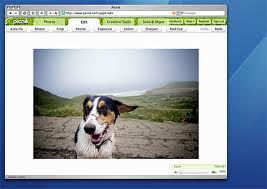
PICNIK FREE ONLINE EDITOR
The basic version will has most what we want certainly. A handy program  for the photo editing and everything so free.

PICNIK FREE ONLINE EDITOR - WEB SITE HERE
Subscribe to my FEED RSS freeware software for pc feed rss


FREE SOFTWARE TO DEFORM IMAGES

FREE SOFTWARE TO DEFORM IMAGES
Today we enjoy a fantastic software, easy to use and that will amaze you with the final result that will allow you to get. Let's talk about DeformerPro, a free program to warp pictures and photos of our friends. With this software to the deformation of images, even the actor or the most beautiful model in the world will become a monster !

Let's see its features :
  1. Simple installation and ease of use disarming.
  2. Strain through a simple grid placed over the image.
  3. Change in any part of the picture.
  4. Save picture formats : JPEG, PNG, BMP.

Have you seen ? A few features but are those needed to create stunning and unreal distortion effects to images and pictures of you or your colleagues might. Just upload an image and begin to distort the picture where you want, through the use of a convenient grid. If you are happy with the results, you can store them in a file format JPG, PNG or BMP. You can zoom in or out of a nose. Create the effect of protruding ears, squeeze their eyes from their sockets, or even exaggerate the mouth until it becomes like that of Pamela Anderson.

DEFORMERPRO is a free software for distorting pictures and photos, to deform images and carries out its function effectively simple. Although the software is also in English, its ease of use is disarming. Warp images with programs like Adobe Photoshop can be very complicated if you are not real graphics experts. That's why DEFORMERPRO is for everyone. Have fun using it as I did. Here is the result of my experiment :
FREE SOFTWARE TO DEFORM IMAGES
DOWNLOAD DEFORMERPRO SOFTWARE  HERE
Subscribe to my FEED RSS freeware software for pc feed rss


THE BEST FREE GRAPHICS SOFTWARE

THE BEST FREE GRAPHICS SOFTWARE
We can not have on our computer program to make graphics. Very often we need to amend, revise and edit our photos and pictures to share on the Web or print. For this reason, operating system graphics utilities are not enough but we need more powerful tools. ADOBE PHOTOSHOP you know that is one of the best programs to make graphics. Unfortunately, it costs a lot. With the advent of open source and freeware, even the software companies who are dedicated to graphics have made available, for free, applications to amend, revise, edit photos and images. The quality of some of the softwares has nothing to envy to programs like Adobe Photoshop or Paint Shop Pro (which still have to buy if you are professionals).

For us web users who love to work on our photos at home for fun, then the following utilities are very good :
  1. PIXIA
  2. GIMP
  3. BLENDER
  4. PHOTOBIE
  5. PAINT.NET
PIXIA :
  1. User interface easy to use.
  2. Creating banners and buttons.
  3. Many filters applied to images.
  4. It supports layers and masks.
  5. Advanced design for the more experienced.
  6. Supported image files : BMP, DIB, EPS, ICO, JPEG, JPG, PICT, PCT, PNG, PSD, PXA, RGB, TGA, TIFF.
  7. Many features on the changing colors.
  8. Updated for Windows 7.
PIXIA : 
THE BEST FREE GRAPHICS SOFTWARE
This freeware graphics software is useful for novices but has a very special feature for those who can draw in freehand mode. PIXIA infact, was created in Japan for the manga designers. This makes us understand how it's a very good photo editing tool.

DOWNLOAD PIXIA HERE

GIMP :
  1. Very innovative user interface and easy to use.
  2. Guides, tutorials for online learning.
  3. Compatibility with systems such as Linux, Windows XP, Mac OS X.
  4. Performing functions very fast.
  5. Lots of editing and retouching functions.
  6. Ability to work on layers and masks.
  7. Used by novices and experts.
  8. Software up to date.
GIMP : THE BEST FREE GRAPHICS SOFTWARE
Who does not know GIMP, one of the best freeware programs for photo retouching. With it you can greatly improve the quality of our images or photos. Definitely recommended for both novices and experienced users.

DOWNLOAD GIMP HERE

BLENDER :
  1. Installation fast and very easy menù to use.
  2. Creation of several animation effects.
  3. Ability to work on various levels of graphics.
  4. Creations in 3D views.
  5. GameBlender function for creating 3D animated games.
  6. Lots of plugs-in download to use on textures created.
  7. Special functions for animation effects.
BLENDER : THE BEST FREE GRAPHICS SOFTWARE
You see what you can create with BLENDER. A spider almost more real than normal. For who do not know, BLENDER is a 3D animation software currently in circulation among the best in 2010. I wanted to review it between editing software so that even some lovers of the 3D could download it. The insiders know him very well. It's the typical program to create landscapes, environments, characters in the third dimension for cartoons and digital film. In Hollywood, on a MAC computers, it makes much use of this software. Even possible, through the GAMEBLENDER function, to create animated 3D games that are very fashionable today in the Web. The algorithms for lighting effects, the numerous effects applied to create textures and more make BLENDER one of the best utility for 3D graphics. And why do not download it ? Check it clicking on the link below to download.

DOWNLOAD BLENDER HERE

PHOTOBIE :
  1. User-friendly interface.
  2. Typical functions such us sizing, cutting, processing colors, etc. ...
  3. Many visualizations applicable.
  4. Support forms and levels.
  5. Several plugs-in to download.
PHOTOBIE : THE BEST FREE GRAPHICS SOFTWARE
PHOTOBIE is an application which also has a free version (the one that interests us). Its practicality and its many functions to apply effects and improve our photos and pictures, do it one of the most widely used graphics programs in 2010.

DOWNLOAD PHOTOBIE HERE

PAINT.NET :
  1. Simple graphical user interface well done.
  2. It supports layers and masks.
  3. Many special effects can be applied.
  4. Many functions for changing the colors.
  5. Traditional functions of rotation, zoom, resize.
  6. Plugs-in downloadable from the Web.
  7. Multi language software.
PAINT.NET : THE BEST FREE GRAPHICS SOFTWARE
PAINT.NET is well known among experts but its quality makes it increasingly used as between the average user, the one that simply needs to change, retouch, resize, apply a horn, change colors, apply special effects to their photos and images. Recommended for its use, very simple. Did you know that this photo editing software, including freeware version, is the evolution of the more famous 
MICROSOFT PAINT
?

DOWNLOAD PAINT.NET HERE

I reviewed 5 FREE GRAPHICS SOFTWARE. One, in particular, Blender, is the "ultimate" for 3D graphics. Certainly, some professional programs pay as Adobe Photoshop, Paint Shop Pro, Corel Draw, have many other functions. But how funcions will we use ? The future is open source and freeware. So if you need a powerful, effective graphics software, choose among them, the best in 2010 aalso updated for Windows 7.

I promise you that I'll review other anyway.

Subscribe to my FEED RSS freeware software for pc feed rss


Privacy