FREE ONLINE PHOTOMONTAGES WITH CELEBRITIES

The creation of photomontage and collage online is really a very widespread at the level of enjoyment by users of the Web ...

CCLEANER : THE BEST SOFTWARE FOR THE PC CLEAN

The need to clean your computer has practically lived by everyone using it today. This need arises because so many programs we install ...

PHOTOMONTAGER.COM DOWNLOAD GRATIS

PHOTOMONTAGER.COM is a site that allows you to create very beautiful photomontages and download them without the need to register ...

NETSTUMBLER FOR WINDOWS 7 - 8

Often we notice that the wifi signal of our WLAN network is weak or, in some moments, it is best received by our network card or USB adapter ...

THE BEST SITES FOR FREE ONLINE PHOTO EDITING

In this article I go on to describe useful tools, applications, software and online services for editing pictures and all ...

SCULPTRIS 1.0 SCULPTING IN 3D

SCULPTRIS 1.0 SCULPTING IN 3D
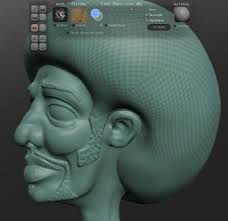
 Today i write a short review about SCULPTRIS 1.0. If you like 3D modeling and you are looking for a software, just for 3D modeling and free, then SCULPTRIS is for you. SCULPTRIS is a program for drawing in 3D, to be used in a freeware way. BLENDER all know but we all know that in order to work with it, we still have the technical capacity to advance, knowledge of computer graphics not indifferent. SCULPTRIS was created for those who do not have much knowledge and want to learn how to model objects in the third dimension.
SCULPTRIS 1.0 SCULPTING IN 3D
We should not have special knowledge of architectural, geometric or free-hand drawing to use this program because its use is based on a simple sphere in 3D that you can edit, manipulate with the mouse, chipping here and there and giving shape to what we want . We can choose the texture you want and turn  it at 360 degrees and we can also work on a plan rather than on a 3D sphere. This program for drawing in 3D is very close to the average user who does not have a big hand but can be effectively helped by the performance of 3D modeling software.

Here are some of its features :
  • Design and modeling in 3D.
  • It requires no installation.
  • It is compatible with graphics tablets.
  • Export and import files in OBJ format.
It runs on Windows operating systems, also 7 and its use is far more simple than complex 3D modeling software such as BLENDER. It also does not require installation. Definitely worth trying. Fun is guaranteed ! To understand its potential watch this video :
OFFICIAL WEB SITE SCULPTRIS HERE
Subscribe to my FEED RSS freeware software for pc feed rss


HOW TO CREATE CARTOONS FROM PHOTOS

FACEBENDER : HOW TO CREATE CARTOONS FROM PHOTOS
Do you have a photo of yourself or your pet and want to create a beautiful caricature with which to make montages ? Nothing could be easier with FACEBENDER. An online resource to be used to deform the face of a famous person or not for free.

Let's see how. Let's say you want to create a caricature from a photo online for free. Go to FACEBENDER and you will have 2 possibilities :
    1. Upload your photo or image from your hard disk. 
    2. Upload your photo or image from the web by entering the right url.
Once loaded the image, you can enter by clicking on the icons to the left of Mr. Bean, the various effects to distort the picture at various points. You can choose the area of deformation through a convenient scroll bar below the image and move your mouse over the photo itself to decide which area of the face change.

Create a free caricature online has never been easier with FACEBENDER. Once you've created the caricature you decide to use it for creating photo montages. I offer the link to an article where I point out online resource to create beautiful photo montages :

FACEBENDER : HOW TO CREATE CARTOONS FROM PHOTOS
I remind you that every free online caricature created on the website, you can print directly or save it to disk.

WEB SITE FACEBENDER HERE
Subscribe to my FEED RSS freeware software for pc feed rss


AOA AUDIOEXTRACTOR REVIEW

AOA AUDIOEXTRACTOR REVIEW : EXTRACT AUDIO FROM VIDEO FILES
A few days ago I found myself faced with a problem and that is to extract only audio from a series of videos shot with my JVC camcorder. It had been decided to take a rock band in black and white format. Eventually I found myself back to the PC 4 video clips with the extension .MOD (JVC extension is assigned to video files into black and white format).

I immediately thought of using Nero Vision Express to extract audio files, since I had already done for file type AVI (Audio Video Interleave) or other types such as MP4. There were problems and so I found myself an audio file full of background noise and virtually ruined. Then I tried using Windows Movie Maker but did not recognize this type of extension (.MOD).

I then decided to use the program to extract audio tracks from video of all types, including FLV (Flash Video) called MediaCoder, but the result was that it had no conversions. So I have found AOA AUDIOEXTRACTOR : freeware software to extract audio from video files of all types. Today i write a short review about this tool.

With AOA AUDIOEXTRACTOR is able to pull in a few seconds audio from 4 video clips with no problems.

Outstanding features :
  1. Quick and easy installation.
  2. It supports many file types : AVI, MPEG, MPG, FLV, DAT, WMV, MOV, MP4, 3GP.
  3. Convert to MP3, WAV, AC3 in seconds.
  4. Using various methods of compression.
  5. Choosing the frequency of the audio to be created.
  6. Support conversion in batch mode.
  7. Possibility to save only parts of the audio video files.
AOA AUDIOEXTRACTOR REVIEW
With AOA AUDIOEXTRACTOR you will have no problems when you want to create CDs from your video. Simply insert the video file in the working window of AUDIOEXTRACTOR and choose how to convert audio. Then you can save the audio file to MP3, WAV or AC3. You can also choose the frequency conversion. So to get a 44110 Mhz for an audio CD.

DOWNLOAD AOA AUDIOEXTRACTOR HERE
Subscribe to my FEED RSS freeware software for pc feed rss


PICNIK FREE ONLINE EDITOR

PICNIK FREE ONLINE EDITOR
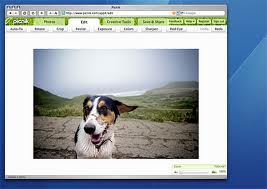
Many people are looking for a service to edit, retouch photos and images called PICNIC, but, the online service in question is called PICNIK but his name does not matter because what we want is its use. Indeed PICNIK is a free online editor. No registration and no installation other than Adobe Flash player, which allows to display the work window. You can download it here.

PICNIK has a premium version that register upon payment, to be able to use many other functions for photo but believe me, the basic version, can do so much.Upload your photos and started to crop, resize, remove red eye, apply animation effects, etc. ... And everything is simplified by the fact that the software is in many languages.As mentioned PICNIK edit photos for free but the important thing is that you can also upload from the Web and that is from FACEBOOK, PICASA albums, FLICKR, etc...

Moreover, the fact of working online may well be used by those who own a MAC. Here are some of its features :
  1. Easy to use interface.
  2. Multilanguage.
  3. Upload photo images from Various social networks.
  4. Various functions and animation effects to be applied.
  5. It works on Windows, Mac, Linux.
  6. Do not install anything and the speed of operations is disarming.
PICNIK FREE ONLINE EDITOR
The basic version will has most what we want certainly. A handy program  for the photo editing and everything so free.

PICNIK FREE ONLINE EDITOR - WEB SITE HERE
Subscribe to my FEED RSS freeware software for pc feed rss


SCHRIMFOTO

SCHRIMFOTO : HOW TO CAPTURE SCREEN IMAGES
Who has not had the need to save in your computer photo or images found here and there in the WEB ? The screen capture is well known by those who reviews software (see I). The screenshot to capture it is important to understand, graphically, the operation of a program. But many users may find useful when surfing the net, save a part area of a page to use it off-line or send it to a friend. The program I am presenting today serves  to capture pictures and photos from your computer screen creating screenshots. And this can be done laso on the desktop, not only on the Internet. What do you call this free application ? : SCHRIMFOTO.

I describe its main functions :
  1. Create screenshots quickly.
  2. Save images in formats such as PNG, JPG, RTF, PDF.
  3. Ability to print the image on the fly.
  4. Send image by e-mail.
  5. Inserting fixed text (watermark) on the screenshot creation.
  6. Update for Windows 7.
SCHRIMFOTO : HOW TO CAPTURE SCREEN IMAGES
Operation it is very simple. This software captures images from the Internet or from your desktop in a verry easy mode. Once installed, you will find on any window to be opened, an icon representing a small camera. Clicking on it will start the capture screen. After capturing the area of your choice you can save it in various formats such as JPG or PNG or decide to send it via email to someone. This always means the simple functions of SCHRIMFOTO. In addition, you can also print directly onto paper the image captured. For example, if it contains text could return useful printing.

And do not forget the useful function of "watermark" inclusion. What is a watermark ? It's a sign that is placed on the photo or image captured so that it can be unusable by others. If, for example, you decide to place an image captured from the Web into your website or blog, you can put on  address of website or blog.

The right program for capturing screen images is SCHIRMFOTO.

DOWNLOAD SCHIRMFOTO GRATIS HERE
Subscribe to my FEED RSS freeware software for pc feed rss


Privacy